
If you’ve searched for HVAC appointment scheduling software recently, you’ve probably found two things: enterprise platforms that cost $300–$500 per seat per month and are built for companies with 50+ technicians, and generic scheduling tools that work fine for a yoga studio but have no idea what an emergency dispatch workflow looks like.
Neither of those solves the actual problem most HVAC contractors have.
This post breaks down what scheduling software actually needs to do for an HVAC business, what the real options are in 2026, and where AI fits into the picture.
What makes HVAC scheduling different from other industries
Scheduling for HVAC isn’t just putting appointments on a calendar. It involves a set of constraints and scenarios that generic scheduling tools weren’t designed for.
Emergency vs. routine calls need completely different workflows. A homeowner booking a spring AC tune-up can be scheduled three weeks out with a standard calendar slot. A homeowner whose heat has stopped working in January cannot wait three weeks, or three hours. The routine caller needs a convenient slot in the next available window. The one with no heat needs to reach a person that night and hear back from someone who can actually come out, and how that happens is a question about your own out-of-hours rota rather than about your calendar.
After-hours is when it matters most. HVAC emergencies don’t wait for business hours. The highest-value calls (system failures, no heat, no AC during extreme weather) come in disproportionately in the evenings, on weekends, and during weather events. A scheduling system that only works when someone is in the office is only solving half the problem.
Multiple job types need different time allocations. A diagnostic visit might take one hour. An AC system replacement might take six. A routine maintenance check might take 45 minutes. Unlike a business that schedules identical appointments, HVAC contractors need scheduling logic that accounts for job type, travel time between jobs, and technician skill level.
The person booking isn’t always the decision maker. Tenants call for rental properties. Office managers call for commercial accounts. Spouses call for each other. The scheduling system needs to capture the right contact and site information without assuming every caller is the property owner.
The three categories of scheduling software HVAC contractors use
1. Field service management platforms (ServiceTitan, Housecall Pro, Jobber)
These are the comprehensive, all-in-one platforms built specifically for trades businesses. They handle scheduling, dispatch, invoicing, payments, customer history, and reporting in a single system.
ServiceTitan is the market leader, used by large HVAC companies and officially partnered with major brands like Carrier and Lennox. It’s genuinely powerful. It’s also priced for larger operations, typically running $125–$400 per user per month with significant onboarding costs. For a 1–5 tech shop that needs scheduling software, it’s often overkill and the learning curve is steep.
Housecall Pro and Jobber are more accessible, priced at $49–$249 per month depending on the plan, and are genuinely good tools for small and mid-size HVAC shops that want scheduling, invoicing, and basic dispatch in one place. If you’re currently managing jobs on a whiteboard or in Google Sheets, either of these is a significant upgrade.
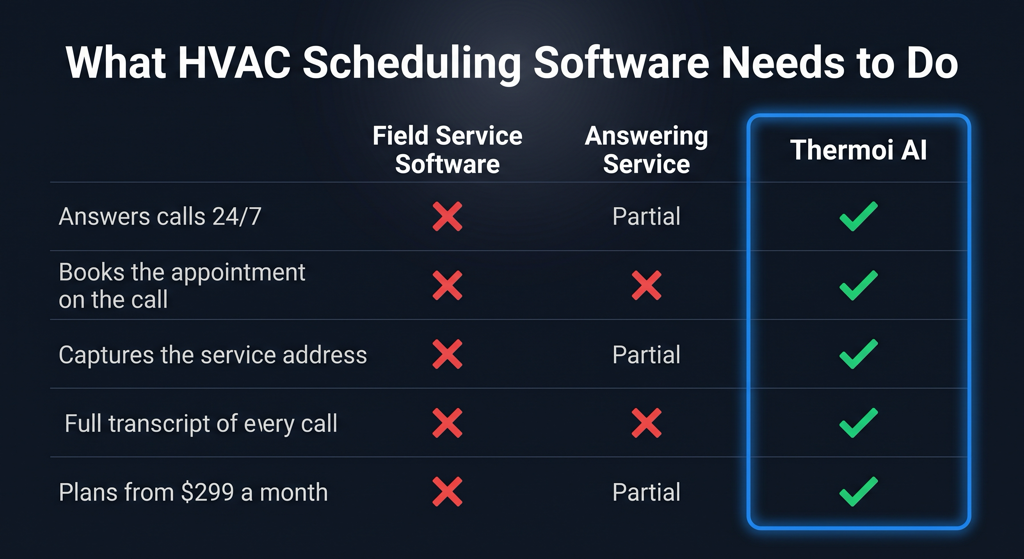
The limitation: all of these platforms assume someone is present to receive the call, book the appointment, and enter it into the system. They solve dispatch and job management well. They don’t solve what happens when nobody picks up the phone.
2. General scheduling tools (Calendly, Cal.com, Acuity)
These are simple online booking tools that let customers self-schedule appointments from a calendar link. They work well for businesses with predictable, identical appointment types: consultants, therapists, tutors.
For HVAC, they’re a partial solution at best. A homeowner with a broken AC at 9pm doesn’t want to visit a booking page and pick a time slot. They want to talk to someone. A booking link also can’t ask what the equipment is doing, or write the answer down in the caller’s own words.
Some HVAC contractors use Calendly as a demo booking tool or for non-urgent maintenance requests, which is a reasonable use case. For primary call handling, it’s not the right tool.
3. AI phone assistants with built-in scheduling
This is the newest category and the one most directly addressing the gap the other two leave open, after-hours call handling with the appointment booked on the call itself.
An AI phone assistant answers every inbound call regardless of the time, conducts a real conversation to understand what the caller needs, captures the problem in the caller’s own words, and books the appointment when there is one. The appointment appears in the contractor’s dashboard without anyone having to manually enter it.
Thermoi’s Sara does this on every call. A homeowner calls at 10pm, Sara answers, asks what the equipment is doing, captures the address and the details, and books the appointment when there is one. The contractor wakes up with a full log of every call that came in overnight, with transcripts and booked appointments already in the dashboard.
The distinction from field service management platforms is that AI phone assistants solve the front-door problem, what happens when the call comes in, rather than the back-office problem of managing jobs once they’re booked. The two aren’t mutually exclusive: many contractors will eventually use both.
What to look for in HVAC scheduling software specifically
Whether you’re evaluating a full field service platform or an AI call handling system, these are the capabilities that matter for HVAC specifically:
A real conversation, not a phone tree. A homeowner whose heat has just quit will not work through a menu or a booking form at 9pm. Whatever answers the phone has to be able to ask what the equipment is doing and take the answer down as the caller said it.
After-hours capability. Any gap in coverage is a gap in revenue. The system should handle calls and booking at 2am with the same reliability as 10am.
Calendar integration. Booked appointments should appear in whatever calendar or dispatch system you already use (Google Calendar, iCal, or a field service platform) without manual data entry.
Call records and transcripts. Every interaction should produce a written record. This matters for quality control, dispute resolution, and understanding your call patterns over time.
Spanish-language support. In Phoenix and across the southwest, a significant portion of homeowner calls come in Spanish. A scheduling system that can’t serve those callers is leaving business on the table.
Realistic pricing for small shops. A 2-tech HVAC operation doesn’t need enterprise software at $300/seat/month. The sweet spot for small shops is $50–$300/month for software that solves a specific problem well.
The gap most HVAC scheduling software doesn’t address
Here’s the honest summary of where the market stands in 2026: the field service platforms (ServiceTitan, Housecall Pro, Jobber) are excellent at managing jobs that are already in the system. They’re not designed to handle the moment when a call comes in and nobody is available to answer it.
That gap (after-hours calls, busy-period overflow, the Friday night emergency) is where HVAC businesses lose the most revenue. It’s also where AI phone assistants are specifically designed to help.
The right setup for most small HVAC shops isn’t one tool that does everything. It’s a combination: a lightweight field service tool for job management and invoicing, and an AI phone assistant to make sure every call that comes in gets answered and booked, regardless of the time.
For contractors not yet using any scheduling software, still managing jobs on a whiteboard or personal cell, the highest-ROI starting point is almost always solving the missed call problem first. A booked appointment you never knew about is worth nothing. A call answered and booked automatically at 11pm on a Saturday is worth $400–$700 before you even wake up.
Thermoi’s approach
Thermoi focuses specifically on the call handling and appointment booking layer, the front door of your HVAC operation. Sara answers every call 24/7, captures the address and the problem in the caller’s own words, and books the appointment when there is one. Every call comes back as a summary and a full transcript.
The first month is free. No card required, cancel anytime. It runs on your real phone line, with full transcripts of every call. At day 30 you get a report (calls answered, appointments booked, recordings) and either pick a plan or walk away owing nothing. After that it’s a monthly plan from $299, or pay per booked appointment.
Full detail on how the booking works, including the calendar and field-service integrations, is on the HVAC appointment scheduling page.